


Leave management Software for Modern Teams
LEAVEHUB
Employee leave management software from SaralFlow LeaveHub helps businesses simplify employee time-off management. Manage leave requests, approvals, leave balances, holiday policies, and absence tracking in one connected platform. Give HR teams and managers better visibility into employee leave while reducing manual administrative work.
Leave Tracking Software: A Better Way to Manage Employee Leave?
There is a better way
If your team still manages leave requests through spreadsheets, emails, or manual trackers, reliable leave tracking software can help reduce messy records, approval delays, and limited visibility.
LeaveHub replaces those outdated processes with a simple, intelligent system that saves time and eliminates errors.
Meet LeaveHub
Employee Leave Management Software for Modern Teams
- Automate approvals with real-time notifications
- Centralizes policies and calendars for your whole team
- Keeps you compliant with configurable leave rules
- Integrates seamlessly with Timesheet for connected workflows
Who It's For
LeaveHub fits your Team, whether you are 6 or 600.
Simple for startups, powerful for growing companies.
For Startups
(0-5 Employees)
- Start free and scale effortlessly as your team grows.
- Enjoy flexible holiday policies that fit your culture.
- Set up and onboard your team in minutes — no IT required.
For SMEs
(6 > Employees)
- Replace spreadsheets with automation and insight.
- Manage policies, approvals, and reports in one place.
- Get enterprise-grade control at a fraction of the cost.
CAPABLITIES
Employee Leave Management Software for Smarter Leave Tracking
Leave Request and Approval Software for Automated Workflows
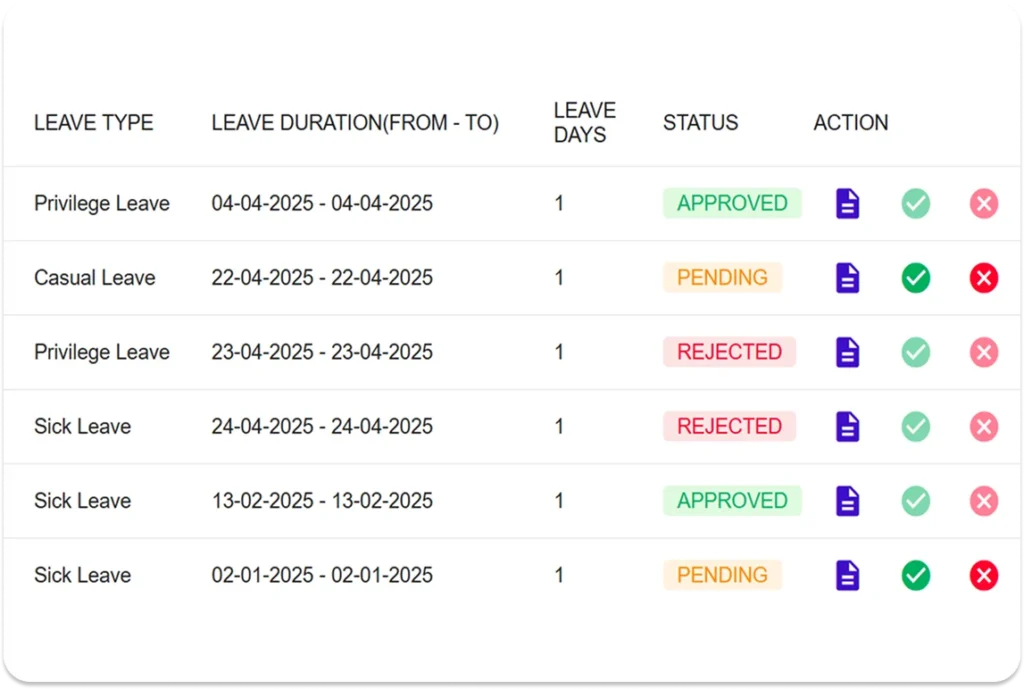
- Enable one-click approvals with manager notifications
- Track pending, approved, and rejected requests in real-time
- Configure escalation or delegation for approvers
- Manage leave cancellations and revisions with ease
- Ensure accurate time tracking with Timesheet integration
- Sync approved leaves with Microsoft Calendar
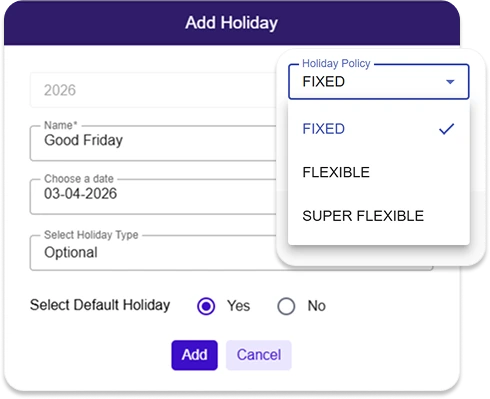
Customize Leave Policies and Holiday Calendars
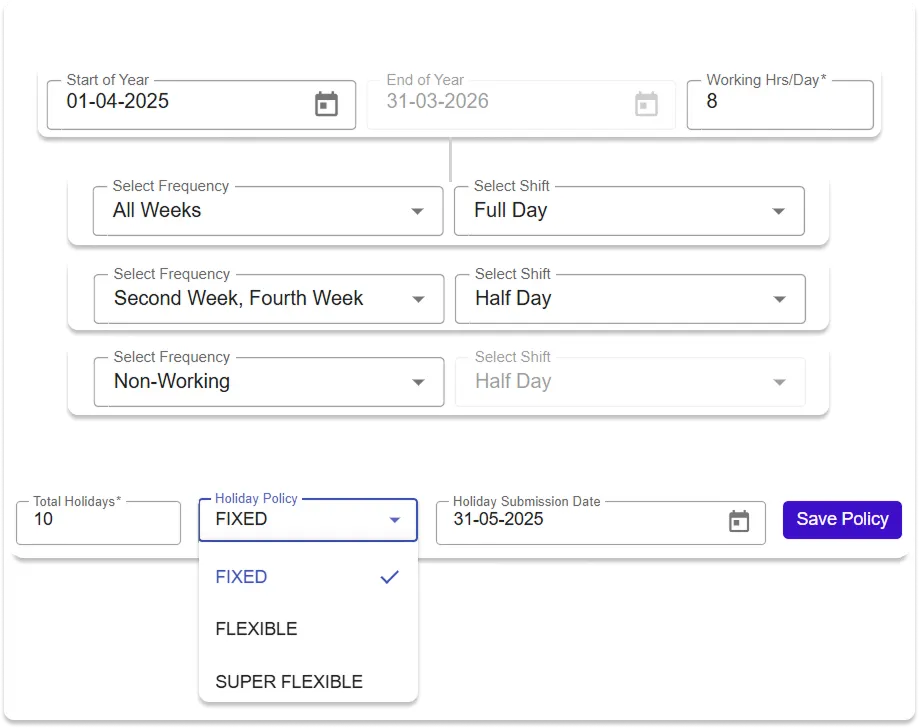
- Define working days, shifts, and regional holidays
- Apply different holiday calendars by department or location
- Choose from fixed, flexible, or super flexible holiday models
- Support diverse teams with inclusive leave policies
Define Leave Rules and Carry-Forward Policies
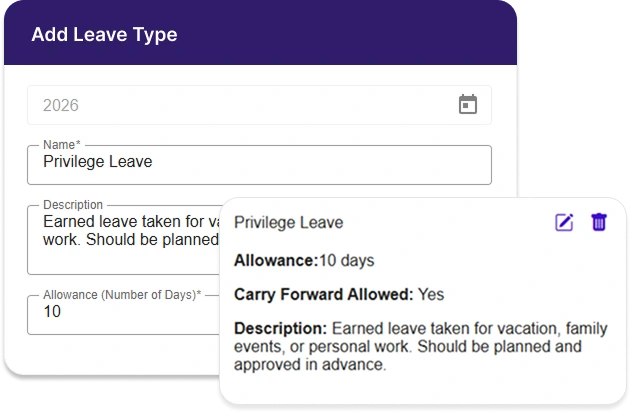
- Create custom leave types tailored to your organization
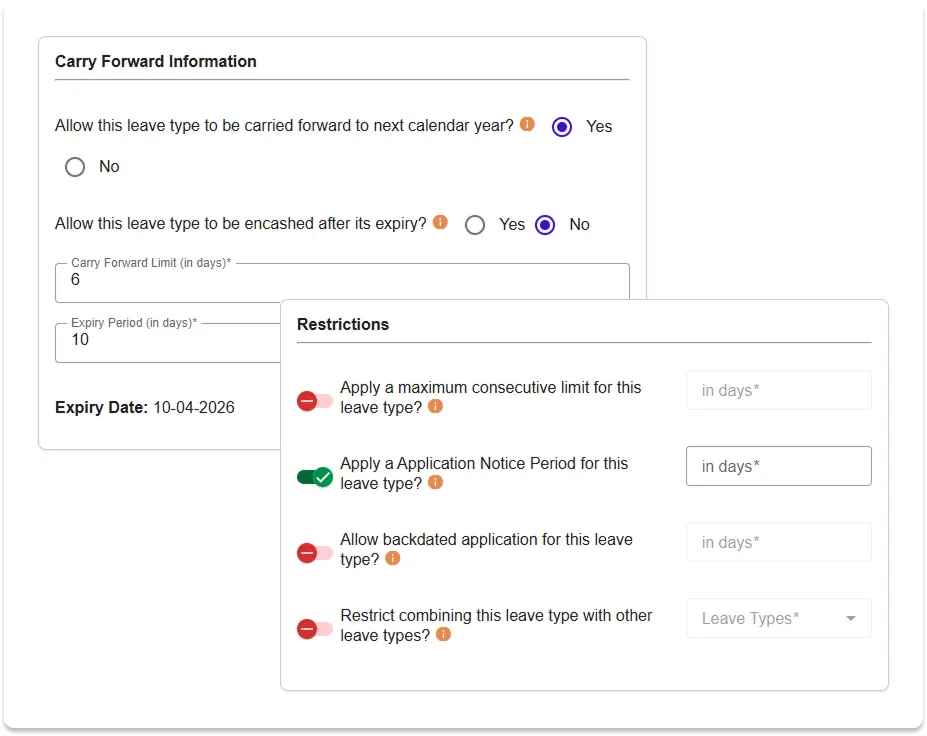
- Set rules for maximum consecutive days, notice periods, and backdated applications
- Apply restrictions on combining certain leave types
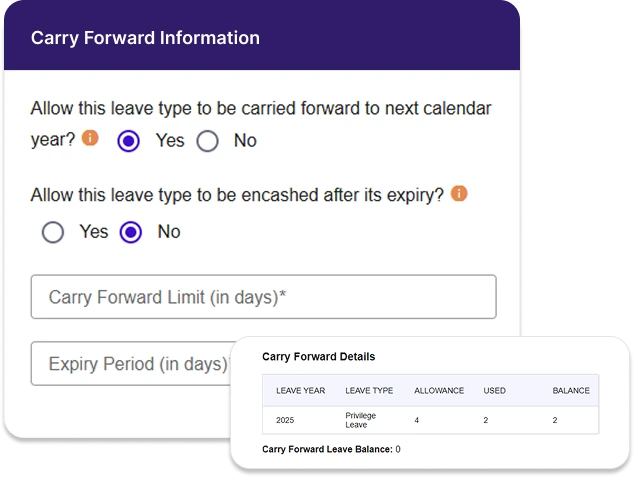
- Configure carry-forward policies, including expiry timelines and maximum limits
Need more control? Explore Advanced Leave Policy Settings to define leave types, restrictions, and carry-forward rules
Generate Insightful Leave Reports
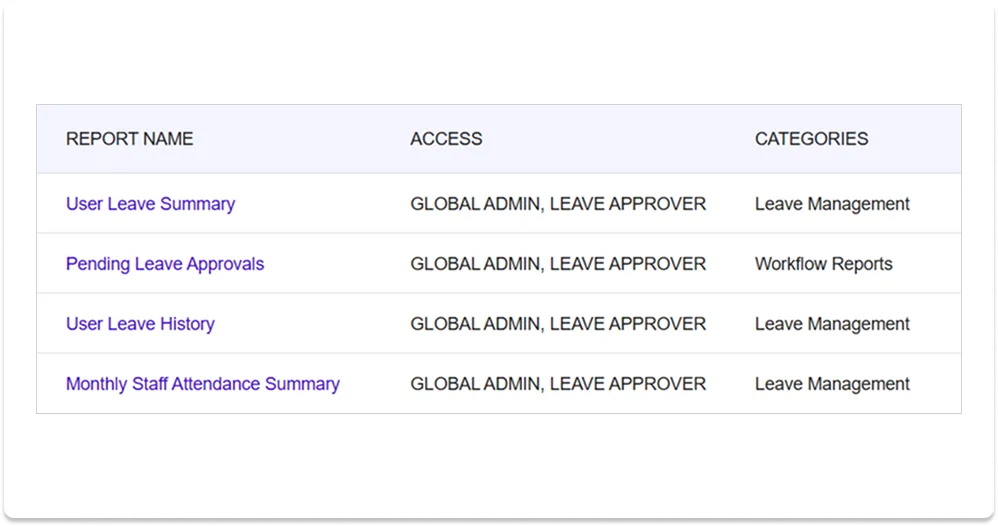
- Access detailed leave balance summaries
- Review pending approvals for teams and departments
- Export attendance data to Excel for planning
- Identify absence patterns and improve workforce planning
- All reports are exportable to Excel for deeper analysis
Advanced Leave Policy Settings
Our employee leave management software gives businesses full control over how teams take time off without requiring HR or IT expertise. Configure leave types, approval rules, holiday calendars, and carry-forward policies to match your organization’s requirements.
-
Fixed Holidays
Common company-wide schedule for all employees.
-
Flexible Holidays
Mix of mandatory and optional holidays that employees can swap.
-
Super Flexible Holidays
Maximum autonomy for employees to choose holidays based on personal, cultural, or religious preferences.
Define multiple leave types such as Annual, Sick, Casual, or Comp Off. Configure per-type rules:
- Maximum consecutive days allowed
- Notice period before applying
- Backdated applications rules
- Leave type combination restrictions
-
Automatic Transfer
Unused leave days roll over based on company policy
-
Policy Compliance
Maximum carry forward limits and expiration rules
-
Flexible Planning
Combined current and carried-forward balances for extended leave
-
Fair Allocation
No loss of earned time off due to year-end boundaries
Seamless Integration
LeaveHub works best when connected with other SaralFlow apps — providing unified workforce management.
Microsoft 365
Syncs approved leaves instantly for transparent scheduling..
Project Essentials App
Automatically blocks timesheet entries for approved leave days, ensuring clean data and compliance.
Project Finance App
Unified user roles, consistent policies, and shared data across applications.
Why Organizations Choose LeaveHub for Absence Management Software
Organizations choose LeaveHub because our employee leave management software combines simplicity, flexibility, and automation for small and growing teams. Manage leave requests, automate approvals, track employee absences, and maintain consistent leave policies in one connected platform.
Built for Modern Workplaces
Part of a Unified Platform
Smart Automation, Less Admin Work
Frequently Asked Questions
LeaveHub is employee leave management software that helps businesses manage employee time off from request submission to approval. It includes leave tracking, configurable policies, holiday calendars, automated approvals, and team-wide visibility into employee absences.
Yes! LeaveHub is free for up to 5 users with all core features included. Simple, affordable pricing applies for teams with 06–50 members.
Yes. LeaveHub integrates seamlessly with the SaralFlow Timesheet app, automatically blocking time entries for approved leave days.
You can choose between Fixed, Flexible, or Super Flexible holiday setups — ensuring cultural inclusivity and business alignment.
LeaveHub offers reports for leave balances, pending approvals, and monthly attendance, all exportable to Excel.
SaralFlow provides flexibility for organizations to maintain independent user sets across applications. This allows teams to add users only where they are needed — for example, someone may need access to Timesheet but not to LeaveHub, or vice versa.
Each app can function independently, so companies can choose to use one or both products without dependency.
Adding existing platform users to LeaveHub is simple: Global Administrators can use the Copy User feature to import specific users who already exist in the platform but are not yet part of the LeaveHub app.
Your organization’s data is stored securely in region-specific data centers with encryption and full isolation.
Visit the LeaveHub Documentation for setup guides, or watch tutorials on our YouTube Channel.
Ready to Simplify Your
Leave Management?
Join growing organizations who’ve replaced manual tracking with LeaveHub. Experience powerful automation and integrated workflows — without the enterprise price tag.
- Free for 45 days
- Every app included
- No credit card required
Looking for pricing? View Plans