
Setup org. Manage team. Access every app
PLATFORM
SaralFlow Platform is the central workspace for the SaralFlow ecosystem. It brings organization settings, team member information, app access, and subscription management together, so your workspace stays organized no matter how many SaralFlow apps you use.
The Business Challenge
Organization details and app access end up scattered
As a company adds more tools and more people, basic questions get harder to answer. Who has access to which app? Where does a team member’s employment information actually live? Which plan is the organization on right now? Platform exists so there is one place to check, instead of five.
Why one workspace matters
Every SaralFlow app depends on the same organization and team member data. When that data is scattered, each app ends up with its own outdated copy instead of one shared source of truth.
What typically happens
Who has access to which app sits in someone's memory or a handful of old emails, not in a system anyone can check.
A team member's department, designation, or joining date gets re-entered differently in every tool that needs it.
Currency, time zone, and departments get configured separately in each system instead of once, centrally.
Nobody can say with confidence which plan the organization is on or what it includes, without digging through an inbox.
By the time someone new needs access, half the apps still have outdated details for people who left months ago.
The Workspace Behind Every SaralFlow App
Platform is not a standalone application. It is the common workspace that every SaralFlow app connects to.
SaralFlow Platform
Organization settings, team member information, app access, subscription and billing.
The flow
Platform
My Apps
Project Essential, Project Finance, LeaveHub
CAPABLITIES
Everything Your Workspace Needs
Organization Setup
Set up the foundation once, and every app builds on it
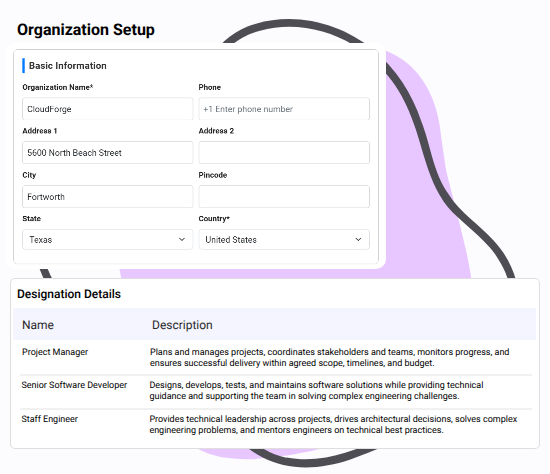
Every SaralFlow app depends on a shared set of organization details, things like currency, timezone, departments, and designations. Getting these right at the start keeps everything downstream consistent.
Why it matters
These are not settings you configure once per app. Set them in Platform, and Project Essential, LeaveHub, and Project Finance all work from the same foundation. A department list entered once in Platform shows up the same way everywhere it's needed, instead of being re-created differently inside each app.
Business outcome
Give every SaralFlow app a consistent, accurate foundation to work from, without repeating setup work across apps.
Team Member Profiles
Keep every team member’s information in one structured place
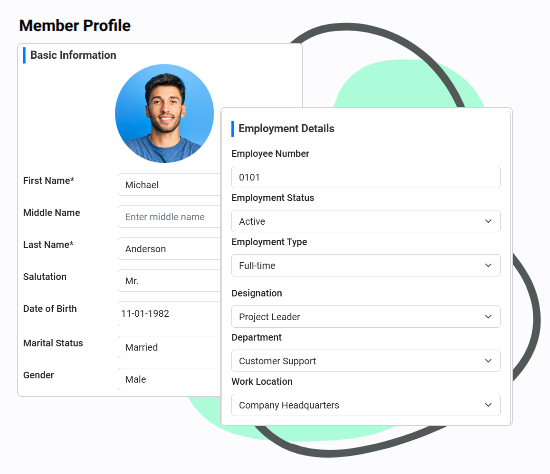
Team member information, from contact details to employment type, department, and date of joining, gets used across every SaralFlow app. Platform is where that information lives and stays current.
Why it matters
Without a shared profile, the same person's details end up re-entered in every app they use, and drift out of sync over time. One profile, referenced everywhere, avoids that. When Project Essential needs to know someone's department or LeaveHub needs their date of joining, it's pulling from the same record, not a separate copy.
Business outcome
Maintain accurate, structured team member information without needing a separate system just to support what SaralFlow apps require.
Multi-Organization Support
Move between organizations without losing context
Some people are part of more than one organization, whether as a consultant, an advisor, or someone managing multiple businesses.
- How it works:
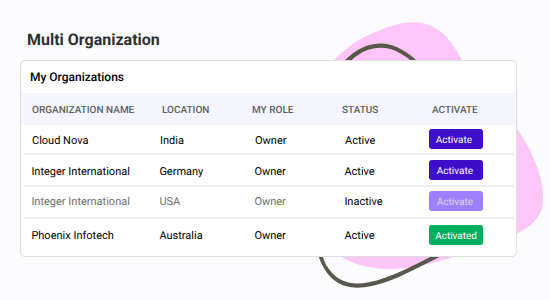
- See every organization where you are an Owner or Member
- Select one to make it your active workspace
- The SaralFlow apps available to you for that organization appear under My Apps
Business outcome
Work across multiple organizations from a single account, with each organization's data kept cleanly separate.
App Visibility and Access
See who has access to what, without a separate tracking sheet
SaralFlow is a set of connected apps. Different team members use different ones depending on their role, and someone needs to know who has access to what. From Platform, you can:
- See which team members have access to which SaralFlow apps
- Move between organizations if you belong to more than one, with each organization's apps and settings kept separate
Platform Roles
Owner
The super user of the organization who by default has access to every SaralFlow app.
Member
Person who access their own information and the SaralFlow apps made available to them individually.
Why it matters
Platform access and app-level access are related but not identical, so a Platform role does not automatically define what someone can do inside a specific app. A Project Manager might have full visibility into their team's timesheets inside Project Essential, while holding a standard Member role in Platform that does not let them edit anyone's employment information.
Business outcome
Manage your plan and expand your SaralFlow workspace as needs grow, without introducing a separate system to do it.
Frequently Asked Questions
SaralFlow Platform is the central workspace of the SaralFlow ecosystem. It is where you manage organization settings, team member information, app access, and subscription and billing, in one place shared across every SaralFlow app you use.
No. Platform is the workspace every SaralFlow customer uses to access their apps. It is not billed separately. Individual apps like Project Essential, LeaveHub, and Project Finance are what your subscription plan covers.
Yes, for personal details like name, contact information, and emergency contacts. Employment information, including department, designation, and employment status, stays managed by the organization.
Through two roles. An Owner is the super user of the organization and has access to every SaralFlow app by default. A Member accesses their own information and only the SaralFlow apps made available to them. Platform roles are separate from app-level roles. A Platform Member could be a Project Manager inside Project Essential with full visibility into their team's timesheets, while still holding a standard User role in Platform that does not include editing employment information.
Yes. Platform gives you visibility into which team members have access to which apps, without needing a separate tracking sheet. Each app still manages its own users and permissions internally.
Yes. If you are a Member or Owner in multiple organizations, Platform shows all of them. You select one as your active workspace, and only that organization's team information, apps, and subscription are shown at a time.
Yes. You can view your current plan, review billing, upgrade when you need a new app or capability, and explore other SaralFlow apps available to your organization.
No. Platform maintains the team member information the SaralFlow ecosystem needs, but it does not handle payroll, recruitment, benefits, or performance management. It is designed to work alongside your existing HR or payroll system, not replace it.
No. Platform is not something you configure on its own. The moment your organization uses any SaralFlow app, Platform is already there as the workspace behind it.
Start With Your SaralFlow Workspace
Keep your Staff information organized, see your SaralFlow apps, manage your subscription and discover new capabilities from one central workspace.
Start with what your organization needs today and expand your SaralFlow workspace as your business grows.